Showing posts with label JavaScript. Show all posts

How to enable/disable button/dropdown using DOM/JavaScript.

One of the most and highly used DOM component is - "document".
In this example we are going to cover how to use the DOM object and we are going to disable/enable the HTML button and dropdown.
Let's write the sample HTML code which has the button and the dropdown element.

disableButton.html

<html>
   <head>
      <script src = "test.js"></script>
   </head>
   <body style="background-color:#F2F2F2;">
      <button id="btn01">OK</button>
      <button onclick="disableElement()">Disable</button>
      <button onclick="enableElement()">Enable</button>
      
      <select id="mySelect">
         <option>Java</option>
         <option>.Net</option>
         <option>PHP</option>
         <option>JavaScript</option>
      </select>
      
      <input type="button" onclick="disable()" value="Disable list" />
      <input type="button" onclick="enable()" value="Enable list" />
   </body>
</html>

Now that we are done with the sample HTML, let's write the JavaScript functions which will enable and disable the button and dropdown element.

test.js

function disableElement() {
    document.getElementById("btn01").value = "Disabled";
    document.getElementById("btn01").disabled = true;
}

function enableElement() {
    document.getElementById("btn01").value = "OK";
    document.getElementById("btn01").disabled = false;
}

function disable() {
    document.getElementById("mySelect").disabled = true;
}

function enable() {
    document.getElementById("mySelect").disabled = false;
}
 
The browser will render the above code something like this.


How to Confirm the password field using the JavaScript

In this example we are going to write a JavaScript code to make sure that the user is entering the password and confirm password fields equal to each other. First of all, we are going to design the UI using the standard html file.

myTest.html


myTest.js
function validate() {
    var password1 = document.getElementById("pass1");
    var password2 = document.getElementById("pass2");
    var msg = document.getElementById("message");
    var greenColor = "#66cc66";
    var redColor = "#ff6666";

    if (password1.value == password2.value) {
        password2.style.backgroundColor = greenColor;
        msg.style.color = greenColor;
        msg.innerHTML = "Password is Matched!";
        return true;
    } else {
        password2.style.backgroundColor = redColor;
        msg.style.color = redColor;
        msg.innerHTML = "Password do not match! Please try again.";
        return false;
    }
}


tutorial.css
  .tutorialWrapper{
      width: 100%;
    }
    .tutorialWrapper form{
      background-color: #A9E2F3;
      border: 1px solid #cc9;
      padding: 10px;
      font-family: verdana;
      width: 75%;
      font-size: 1em;
    }
    .fieldWrapper{
      margin: 2px 0 2px 0;
      padding: 0;
    }
    .tutorialWrapper label{
      float: left;
      text-align: right;
      margin: 0 5px 0 0;
      width: 30%;
    }
    .tutorialWrapper input{
      width: 200px;
      border: 1px solid #cc9;
    }
    .confirmMessage{
      margin: 0;
      padding: 0;
      font-size: .8em;
    }

Output

When Password and Confirm Password fields are equal then we will get the following result.


Until both the fields are not equal to each other it will keep displaying the below result.


JavaScript to disable numbers in the text box

Business use case:

Create two text boxes  and put following client side validation to it.
  • Disable numbers to be printed
  • Enable only numbers
Implementation:

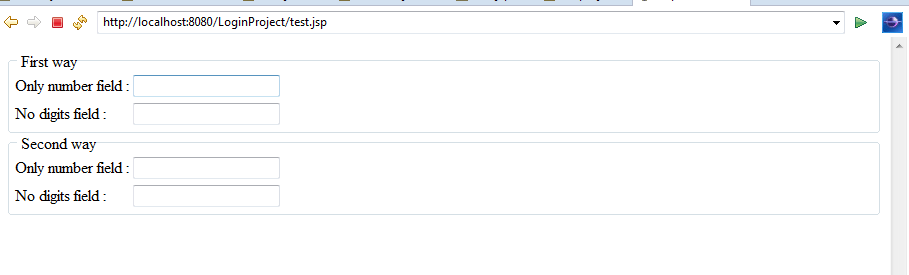
We can achieve the above business use case in at least two different ways by using java script on the client side. We can create a jsp or html page for the text box creation and we can call the java script function from there. 

test.jsp

<html>
<head>
<script src="script.js"></script>
</head>
<body>
    <fieldset>
        <legend>First way</legend>
        <table>
            <tr>
                <td>Only number field :</td>
                <td><input type="text" name="number"
                    onkeypress="return onlyNumbers(event)" /></td>
            </tr>

            <tr>
                <td>No digits field :</td>
                <td><input type="text" name="number"
                    onkeypress="return !onlyNumbers(event)" /></td>
            </tr>
        </table>
    </fieldset>
    <fieldset>
        <legend>Second way</legend>
        <table>
            <tr>
                <td>Only number field :</td>
                <td><input type="text" maxlength="10"
                    onkeypress="return validNo(this,event)" /></td>
            </tr>
            <tr>
                <td>No digits field :</td>
                <td><input type="text" maxlength="10"
                    onkeypress="return !validNo(this,event)" /></td>
            </tr>
        </table>
    </fieldset>
</body>
</html>


Now, below java script is the core ingredient of this example. Here, I'm writing two java script functions which essentially do the same thing.

script.js

function validNo(input, kbEvent) {
    var keyCode, keyChar;
    keyCode = kbEvent.keyCode;
    if (window.event)
        keyCode = kbEvent.keyCode;
    else
        keyCode = kbEvent.which;                                    
    if (keyCode == null) return true;
    keyChar = String.fromCharCode(keyCode);
    var charSet = "0123456789";
    if (charSet.indexOf(keyChar) != -1) return true;
    if (keyCode == null || keyCode == 0 || keyCode == 8 || keyCode == 9 || keyCode == 13 || keyCode == 27) return true;
    return false;
}

function onlyNumbers(e) {
    var keynum;
    var keychar;
    var numcheck;

    if(window.event) // IE
    {
        keynum = e.keyCode;
    }
    else if(e.which) // Netscape/Firefox/Opera
    {
        keynum = e.which;
    }
    keychar = String.fromCharCode(keynum);
    numcheck = /\d/;
    return numcheck.test(keychar);
}


Disable right click from the web page.

Below java script will prevent any user from right clicking on the web page. We can include the following script in the head tag of jsp or html page.